

You posted and are hoping people see it... There's a dashboard full of numbers staring back at you and no clear idea what any of it means. You don't need a marketing degree to read Instagram analytics. You need to know where to look, what each number measures, and which ones are worth your time. This blog covers all three.
First, make sure you can see your data
Instagram's built-in analytics (called Insights) only show up on professional accounts, meaning Business or Creator accounts. If you're on a personal account, the dashboard won't appear.
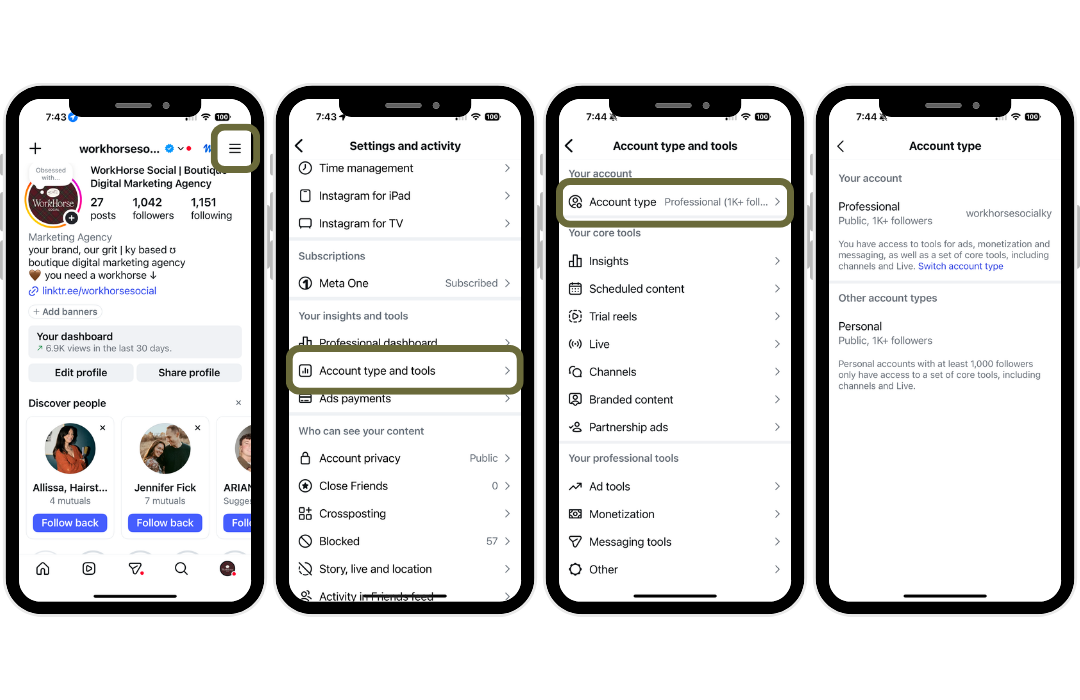
Switching account types takes about a minute, and here is how you’ll do it: go to your settings > find the account options > choose to switch to a professional account.
The numbers that matter
When you open Insights, you'll see a handful of headline metrics. Here's what each one actually tells you.
Views
Views is the total number of times your content was shown, including repeat views from the same person. Instagram now uses Views as its main counting metric, replacing the old "Impressions" number. If you're comparing this year to last year, keep that in mind.
Accounts reached
This counts unique accounts that saw your content. Each person is counted once, no matter how many times they saw it.
Why it matters: Views and reach tell different stories. If views are much higher than reach, the same people are watching again and again (a good sign). If reach is climbing faster than views, you're getting in front of new people.
Accounts engaged
This is the number of unique accounts that actually did something: liked, commented, shared, saved, or sent a message.
Compare it to accounts reached and you get a quick read on how well your content connects. A big reach with tiny engagement means Instagram showed your content to plenty of people, but it didn't make them stop and act.
Interactions
Interactions counts the actions themselves (likes, comments, saves, shares). Not all interactions are equal. A like takes a second. A save or a share means someone found your content valuable enough to keep or send to a friend. Pay extra attention to those two.
Followers
The follower tab shows your total, plus growth over time and when your audience is most active. Don't just watch the total. Look at net growth: how many people followed versus unfollowed over the period you're viewing.
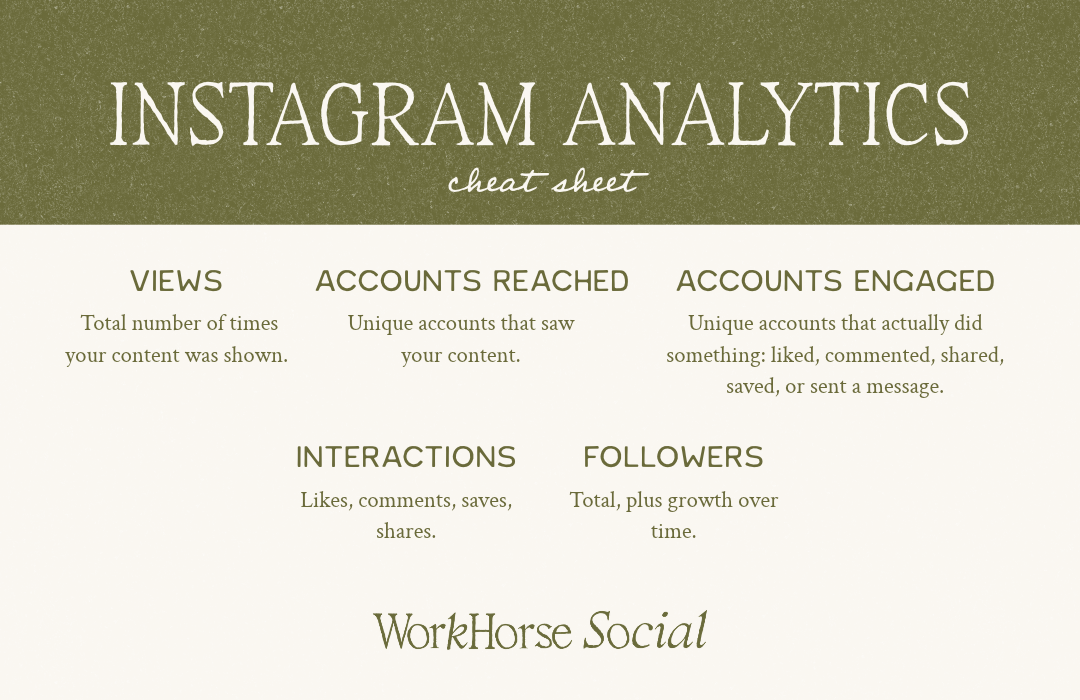
Here is a cheat sheet you can save to remember what each analytic means for you and your content.
reading the relationships
One number on its own rarely tells you much. The insight comes from comparing them.
High views, low engagement: Your content got distributed but didn't land. Look at your hook, your visuals, and your call to action.
Low views, high engagement: The people who saw it loved it, but not enough saw it. The content is good; the distribution needs work. Try different timing, formats, or topics.
High reach, low follower growth: People are seeing you but not following. Check that your bio and profile make it obvious why they should.
Lots of saves and shares: This is gold. It means your content is useful or relatable. Make more of it.
A simple monthly routine
You don't need to live in your dashboard. Once a month, set aside 20 minutes and answer four questions:
Which three posts or Reels performed best? What do they have in common?
Which performed worst? What can you do differently?
Is my audience growing? And is it the right audience?
What's one thing I'll do more of next month?
Write the answers down. In a few months, you'll have a record of what actually works for your business, not what some guru says should work.
The TAKEAWAY
Instagram analytics are there for you to learn about your audience, how they respond, and lets you stop guessing where to spend your time and start doing more of what works. If reading the data is one thing and acting on it is another, that's where we come in. Workhorse Social can help you turn your numbers into a plan. Click the button below to get started.
